
Setting up or reviewing Archiving security settings is the fourth of seven procedures you should complete as you prepare for Archiving.
It is essential to prepare properly before you perform data archiving; you cannot change data once you have archived.
Related References
- Preparing for Archiving: An Overview
- Understanding the Effects of Archiving/Year End Transfer Processing
How to Set Up or Review Archiving Security Settings
- From the Department Manager icon in the system tray, Click Administration-DM Administration. Go to File-User Setup.
- Navigate to the User ID of the person who will perform the Year End and Archiving procedures.
- Ensure that the Archive column is checked for the Accounting Module.
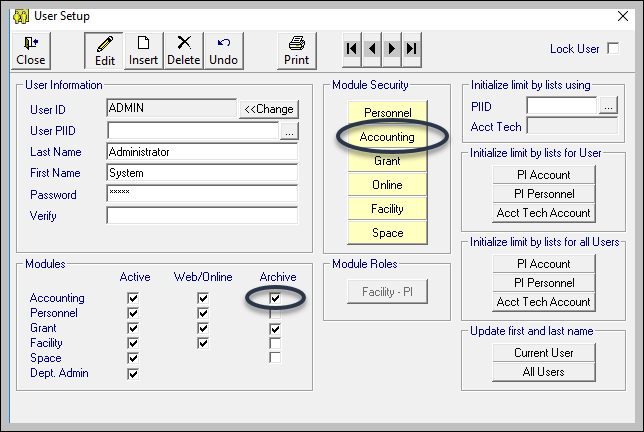
- Click on the Accounting Module Security button to take you to the Accounting Module security system for that user. Make sure the Year End option is set to Yes.

What's Next?
Continue to the next procedure to prepare for archiving here.